3D Stereoscopic glasses are nothing new. In fact you had them when you were a kid and probably didn’t even know it. Remember the ViewMaster™ that showed all the cool Disney characters in full 3d? The ViewMaster™ allowed you to look at two pictures of the same thing taken from a slightly different view point and tricked your brain into seeing one 3d image.
In order to see things in 3D each eye must see a slightly different picture. This is done in the real world by your eyes being spaced apart so each eye has its own slightly different view. The brain then puts the two pictures together to form one 3D image that has depth to it.
Still want to know how do 3D glasses work? Keep reading!
Anaglyphic [ana·glyph·ic /”a-n&-‘gli-fik/] adjective — A stereoscopic motion or still picture in which the right component of a composite image usually red in color is superposed on the left component in a contrasting color to produce a three-dimensional effect when viewed through correspondingly colored filters in the form of spectacles.
The mode of 3D presentation you are most familiar with are the paper glasses with red and blue lenses. The technology behind 3D, or stereoscopic, movies is actually pretty simple. They simply recreate the way humans see normally.
Since your eyes are about two inches apart, they see the same picture from slightly different angles. Your brain then correlates these two images in order to gauge distance. This is called binocular vision – ViewMasters™ and binoculars mimic this process by presenting each eye with a slightly different image.
Now you’re learning! Need to know more about how do 3D glasses work? Read on. The binocular vision system relies on the fact that our two eyes are spaced about 2 inches (5 centimeters) apart. Therefore, each eye sees the world from a slightly different perspective, and the binocular vision system in your brain uses the difference to calculate distance. Your brain has the ability to correlate the images it sees in its two eyes even though they are slightly different.
If you’ve ever used a ViewMaster™ or a stereoscopic viewer, you have seen your binocular vision system in action. In a View-Master, each eye is presented with an image. Two cameras photograph the same image from slightly different positions to create these images. Your eyes can correlate these images automatically because each eye sees only one of the images.
A 3D film viewed without glasses is a very strange sight and may appear to be out of focus, fuzzy or out of register. The same scene is projected simultaneously from two different angles in two different colors, red and cyan (or blue or green). Here’s where those cool glasses come in — the colored filters separate the two different images so each image only enters one eye. Your brain puts the two pictures back together and now you’re dodging a flying meteor!
3D glasses make the movie or television show you’re watching look like a 3-D scene that’s happening right in front of you. With objects flying off the screen and careening in your direction, and creepy characters reaching out to grab you, wearing 3-D glasses makes you feel like you’re a part of the action – not just someone sitting there watching a movie. Considering they have such high entertainment value, you’ll be surprised at how amazingly simple 3-D glasses are.
The binocular vision system relies on the fact that our two eyes are spaced about 2 inches (5 centimeters) apart. Therefore, each eye sees the world from a slightly different perspective, and the binocular vision system in your brain uses the difference to calculate distance. Your brain has the ability to correlate the images it sees in its two eyes even though they are slightly different.
If you’ve ever used a View-Master or a stereoscopic viewer, you have seen your binocular vision system in action. In a View-Master, each eye is presented with an image. Two cameras photograph the same image from slightly different positions to create these images. Your eyes can correlate these images automatically because each eye sees only one of the images.
The reason why you wear 3-D glasses in a movie theater is to feed different images into your eyes just like a View-Master does. The screen actually displays two images, and the glasses cause one of the images to enter one eye and the other to enter the other eye. There are two common systems for doing this:
Although the red/green or red/blue system is now mainly used for television 3-D effects, and was used in many older 3-D movies. In this system, two images are displayed on the screen, one in red and the other in blue (or green). The filters on the glasses allow only one image to enter each eye, and your brain does the rest. You cannot really have a color movie when you are using color to provide the separation, so the image quality is not nearly as good as with the polarized system.
At Disney World, Universal Studios and other 3-D venues, the preferred method uses polarized lenses because they allow color viewing. Two synchronized projectors project two respective views onto the screen, each with a different polarization. The glasses allow only one of the images into each eye because they contain lenses with different polarization.
The name “3D” is a short-hand abbreviation for “three-dimensional,” meaning that an image or object exists (or appears to exist) on three axes — X, Y and Z. If you think of a piece of graph paper, the X axis runs horizontal across the page and the Y axis runs vertically. This makes up the basics of a two-dimensional (or 2D) image. If you were to put a pencil the center of that piece of the graph paper, the pencil would become the Z axis. You would then have enough axes to create a three dimensional, or 3D, image.
Everything you need to know about creating the best ChromaDepth images can be found here:
When we begin the process, we will send you a die line in Illustrator .eps format and/or PDF format. To keep your return artwork files to a minimum size, you only need to design one frame and we will step and repeat the rest. (Please read the instructions below carefully.)
We can accept both Mac and PC files. (Our graphics dept. uses Mac OS X.)
Acceptable File Types
Adobe Photoshop CS4 or older
Adobe Illustrator CS4 or older
Adobe Indesign CS4 or older
Acceptable Formats For Output: .tif, .jpg, .eps, pdf. .psd, .ai, ind.
Art and logos must be at least 300-dpi file resolution.
Acceptable Mediums For Output
1) CD-R or DVD-R (Please provide color output of design)
2) Via e-mail artwork@3dglassesonline.com (please reference your sales person’s name in the body of the email) – No files over 5 MB please.
* IF your art files are larger than 5 MB, please forward a disc to your salesperson via overnight delivery or you may use our “You Send It” link athttp://dropbox.yousendit.com/WilliamChiles12510051.
Design Guidelines for Glasses
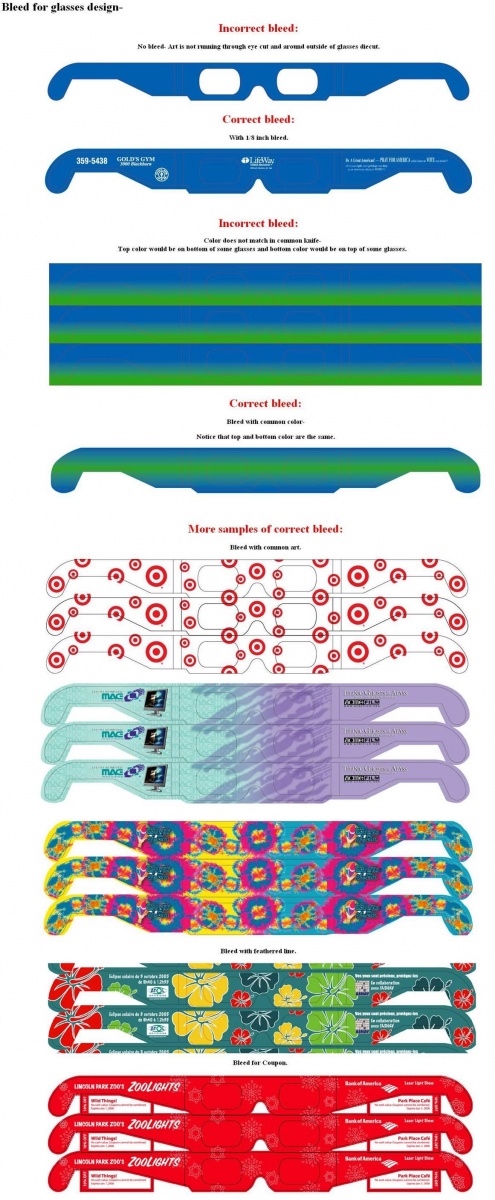
1) Glasses are cut on a common knife. The top one cuts the bottom of the next. Artwork must be the same in the common knife area to avoid bleed over onto the top of the next frame. (If you have questions or need assistance with the bleed areas, please call William Chiles, Graphics Dept. 800-767-8427 or 901-381-1515).
2) Provide 1/8″ bleed reference outside die cut.
3) Keep important copy and images 1/8″ away from any die cut edge and/or scores
4) Convert all font files to outline format.
WHAT FORMAT DO WE SEND THE FILE IN?
Files should be sent in Adobe PhotoShop (.psd) format, Layered file, RGB, and in 300 dpi. {Files can also be saved in Adobe Illustrator (.ai) format, Layered file.}
THINGS TO WATCH OUT FOR:
– Please try and stay away from using the red color as a primary color for text or image.
– The red lens will make it blend to white and cause a confusing effect for the eyes.
– Solid backgrounds are not recommended. You need a reference to make the images pop more.
– Avoid white backgrounds (this tends to cause more ghosting when converted to cmyk)
Any text or object that comes forward (Pops off the page) needs to be complete. It can not be cut from the edge of the page. This would cause poor effect in popping off the page.
Please send info on important items you want to come forward and/or back. Send also info on what you do not want to be offset.
Why RGB if you print CMYK?
Anaglyph image is created from a stereo image. When you give us an image, we will create the stereo image (Same image at a different perspective). Then the file is converted to Anaglyph when swapping out the red channel from Original image to new perspective image. This gives the Red/Blue offset. Then the file is converted to CMYK.
WHAT IS A LAYERED FILE?
When you create art it is usually set up in layers, then flatten for layout
Example:
Layer 1- Text
Layer 2- Shadow of text
Layer 3- Object A
Layer 4- Object B
Layer 5- Background
If art is flat the conversion takes longer. I will have to go back and break the file back into layers, moving the layers to get the other perspective image. When the art is flattened you lose the info that was behind each item- so we would have to clone or recreate what was lost. A layered file means (HOURS LESS) work.
COMPLETE IMAGE?
Content for 3D conversions need to have the trim/bleed references. It also means that if you want image to pop off the page it can not be cropped or trimmed out; however, for items that are pushed back into the page, cropping or trimming out is okay. Remember to keep items of importance away from trim. If you have half an item running off the edge of the page you will end up with more or less of that item, depending on the perspective.
If you need more help, give William Chiles a call at 901-381-1515 or 1-800-767-8427 or email to: artwork@3dglassesonline.com
Rules
Pattern needs to be PMS: Warm Red.
Hidden image and/or message needs to be PMS: 333 or 332
You can convert the colors to CMYK to print 4 color or RGB for web use. If you want to hide the image more you can also add Yellow, Orange, and Pink.
Set your pattern first (red) 100%, then place hidden image and/or message on top (pms333).
Set the opacity to 20% to 40% (light enough not to see it without glasses,but dark enough to see with glasses. Every printer will be different, so that part we can not give an exact %.)
Another way to make it hard to read without the glasses, but to make the opacity % darker, is to set the hidden message upside down.
How many people can read upside down? It works every time.
If you have any questions on art set up for hidden message or glasses, give William Chiles a call at 901-381-1515
The addition of special effects to a theatrical presentation to create a “fourth dimension” – the sensation of tactile experience: scent, temperature, touch. Examples:Beetles tickle the legs of unsuspecting cinema-goers, the wing beat of a gigantic dragon breezes through the rows of seats and spiders descend from the ceiling.
The reason you need to wear glasses to watch 3D is that a separate image needs to be sent to each eye, with the brain combining the two images into a single image with 3D characteristics. In other words, the 3D process actually fools your brain into thinking it is seeing a 3D image, so it creates one for you.
ColorCode 3D is a patented stereo viewing system deployed in the 2000s that uses amber and blue filters. Notably, unlike other anaglyph systems, ColorCode 3D is intended to provide perceived nearly full colour viewing (particularly within the RG color space) with existing television and paint mediums. One eye (left, amber filter) receives the cross-spectrum colour information and one eye (right, blue filter) sees a monochrome image designed to give the depth effect.
In the United Kingdom, television station Channel 4 commenced broadcasting a series of programmes encoded using the system during the week of 16 November 2009. Previously the system had been used in the United States for an “all 3D advertisement” during the 2009 Super Bowl for SoBe, Monsters vs. Aliens animated movie and an advertisement for the Chuck television series in which the full episode the following night used the format. All of those ColorCode glasses were manufactured by American Paper Optics.
Complementary color anaglyphs employ one of a pair of complementary color filters for each eye. The most common color filters used at American Paper Optics are our specialized red and cyan. Employing tristimulus theory, the eye is sensitive to three primary colors, red, green, and blue. The red filter admits only red, while the cyan filter blocks red, passing blue and green (the combination of blue and green is perceived as cyan). If a paper viewer containing red and cyan filters is folded so that light passes through both, the image will appear black. Another recently introduced form employs blue and yellow filters. (Yellow is the color perceived when both red and green light passes through the filter.)
Anaglyph images have seen a recent resurgence because of the presentation of images on the Internet as well as the 3D movie craze. Where traditionally, this has been a largely black & white format, recent digital camera and processing advances have brought very acceptable color images to the internet and DVD field. With the online availability of low cost paper glasses with improved red-cyan filters, and plastic framed glasses of increasing quality, the field of 3D imaging is growing quickly. Scientific images where depth perception is useful include, for instance, the presentation of complex multi-dimensional data sets and stereographic images of the surface of Mars. With the recent release of 3D DVDs, they are more commonly being used for entertainment. Anaglyph images are much easier to view than either parallel sighting or crossed eye stereograms, although these types do offer more bright and accurate color rendering, most particularly in the red component, which is commonly muted or desaturated with even the best color anaglyphs. A compensating technique, commonly known as Anachrome, uses a slightly more transparent cyan filter in the patented glasses associated with the technique. Processing reconfigures the typical anaglyph image to have less parallax to obtain a more useful image when viewed without filters.
To present a stereoscopic motion picture, two images are projected superimposed onto the same screen through orthogonal polarizing filters. It is best to use a silver screen so that polarization is preserved. The projectors can receive their outputs from a computer with a dual-head graphics card. The viewer wears 3D glasses which also contain a pair of orthogonal polarizing filters. As each filter only passes light which is similarly polarized and blocks the orthogonally polarized light, each eye only sees one of the images, and the effect is achieved. Linearly polarized glasses require the viewer to keep his head level, as tilting of the viewing filters will cause the images of the left and right channels to bleed over to the opposite channel – therefore, viewers learn very quickly not to tilt their heads. In addition, since no head tracking is involved, several people can view the stereoscopic images at the same time.
To present a stereoscopic motion picture, two images are projected superimposed onto the same screen through circular polarizing filters of opposite handedness. The viewer wears 3D glasses which contain a pair of analyzing filters (circular polarizers mounted in reverse) of opposite handedness. Light that is left-circularly polarized is extinguished by the right-handed analyzer, while right-circularly polarized light is extinguished by the left-handed analyzer. The result is similar to that of steroscopic viewing using linearly polarized glasses, except the viewer can tilt his or her head and still maintain left/right separation.
There are two main types of 3D technology that are ready for you to use now. Commonly known as ‘active’ and ‘passive’, the two types deliver a similar effect, but have massive differences in the production cost, and how it is passed on to you, the consumer.
Active-shutter 3D is going to be the way most people end up seeing 3D in their homes. With this technology, the TV is basically the same as your current one, but with some increased performance to make the 3D look as good as possible. To see 3D, you’ll need a special pair of glasses that contain a system that shuts off the light to first one eye, then the other.
While the glasses are blocking light to one eye, the TV is showing an image to the other eye, then the process switches, and the TV shows a separate image, shot at a slightly different angle, to your other eye. This synchronized shuttering basically provides a Full HD video stream for each eye, each very slightly different. Because your brain is translating two separate signals from your eyes all the time, it’s fooled into seeing 3D.
The passive system, by contrast, uses a very simple set of glasses. These use circular polarization to provide each of your eyes a different image from the same source. In cinemas, this works because two images are projected on to the screen in quick succession. They appear at a rate of 144Hz through a special filter that adds polarisation, alternating between the left and right eyes, 72Hz for each.
Translating the passive system for home use would produce much more expensive televisions. These would need to have a panel fitted in front of the LCD or plasma panel that alternated in time with the left and right images. LG is using this system in its 3D TV for pubs.
No. Between 5 percent and 10 percent of Americans suffer from stereo blindness, according to the College of Optometrists in Vision Development. They often have good depth perception–which relies on more than just stereopsis–but cannot perceive the depth dimension of 3D video presentations. Some stereo-blind viewers can watch 3D material with no problem as long as they wear glasses; it simply appears as 2D to them. Others may experience headaches, eye fatigue or other problems.
A decoder is any type of viewer that has a red lens that helps to expose hidden messages in specially printed promotions or for hidden messages on websites.
Many viewers have experienced newer 3D presentations, such as IMAX 3D, in movie theaters. Though the technologies differ somewhat–most theaters use passive polarized 3D glasses, for example–the main practical difference between 3D TV in the home and theatrical 3D is the size of the screen. In the home, the image is generally much smaller, occupying a lower percentage of viewers’ fields of vision. Among TV makers we asked, only Panasonic recommend a closer seating distance (of 3x the screen height away–about 6.2 feet from a 50-inch screen) for a better experience; however, we suspect sitting closer or watching on a bigger screen will definitely help with any home 3D presentation. Smaller screens may also present other issues unique to 3D, such as a relatively narrow viewing distance range.
One advantage of 3D TV at home as opposed to the theater is user control. You can generally sit where you want relative to the screen at home, and some 3D compatible TVs provide some control over the 3D experience in addition to standard picture settings. Samsung’s models, for example, allow you to adjust the “G axis,” or the amount of 3D effect, to taste, comfort or to compensate for variations in eye spacing.
A 3D TV or theater screen showing 3D content displays two separate images of the same scene simultaneously, one intended for the viewer’s right eye and one for the left eye. The two full-size images occupy the entire screen and appear intermixed with one another–objects in one image are often repeated or skewed slightly to the left (or right) of corresponding objects in the other–when viewed without the aid of special 3D glasses. When viewers don the glasses, they can perceive these two images as a single 3D image.
Active Shutter Glasses:
This technology has been adopted by most consumer electronics firms like LG, Samsung, Panasonic, etc. With this technology, an HDTV will display one image to your left eye and one image to your right eye. Since the effective frame rate is halved, these HDTVs need to have double the refresh rate of HDTVs (60 Hz). This is why you will find that all 3D HDTVs have a minimum frame rate of 120 Hz (most have a frame rate around 240 Hz or even 480 Hz). You will need a pair of active shutter glasses if you buy a 3D-capable HDTV in 2010 and onwards.
Passive (or Polarized) Glasses:
The display shows two overlapping images and the glasses have polarized lenses. Each lens is polarized so that it can see only one of the two overlapping images.
The only drawback is that viewers will need to sit directly in front of the display to get the full 3D effect. If the viewer is sitting on the side, the 3D effects will be less pronounced.